Why your phone battery wears out, and how to slow it down
Lithium-ion batteries age with every charge cycle, and heat speeds it up. A few habits can keep yours healthier for longer.
The short version
- All lithium-ion batteries lose capacity over time.
- Heat is one of the biggest causes of faster ageing.
- Many phones now offer settings that limit charging to protect the battery.
- The “memory effect” of older nickel-cadmium batteries does not apply to lithium-ion.
If your phone lasted all day when it was new and now needs a top-up by mid-afternoon, nothing is wrong with it. Its battery is ageing the way every lithium-ion battery does.
A short history of the lithium-ion battery
Lithium is the lightest metal, and it gives up electrons readily, which makes it attractive for storing a lot of energy in a small, light package. Researchers worked on lithium batteries through the 1970s and 1980s, and the first commercial lithium-ion batteries went on sale in 1991. They made modern laptops, phones and later electric cars possible.
In 2019 the Nobel Prize in Chemistry was awarded to John Goodenough, Stanley Whittingham and Akira Yoshino for their work on the development of lithium-ion batteries.
What is happening inside
A lithium-ion battery stores energy by moving lithium ions between two electrodes. Each full charge and discharge, called a cycle, causes small chemical changes that slowly reduce how much charge the battery can hold. Manufacturers typically design phone batteries to keep most of their original capacity for several hundred full cycles.
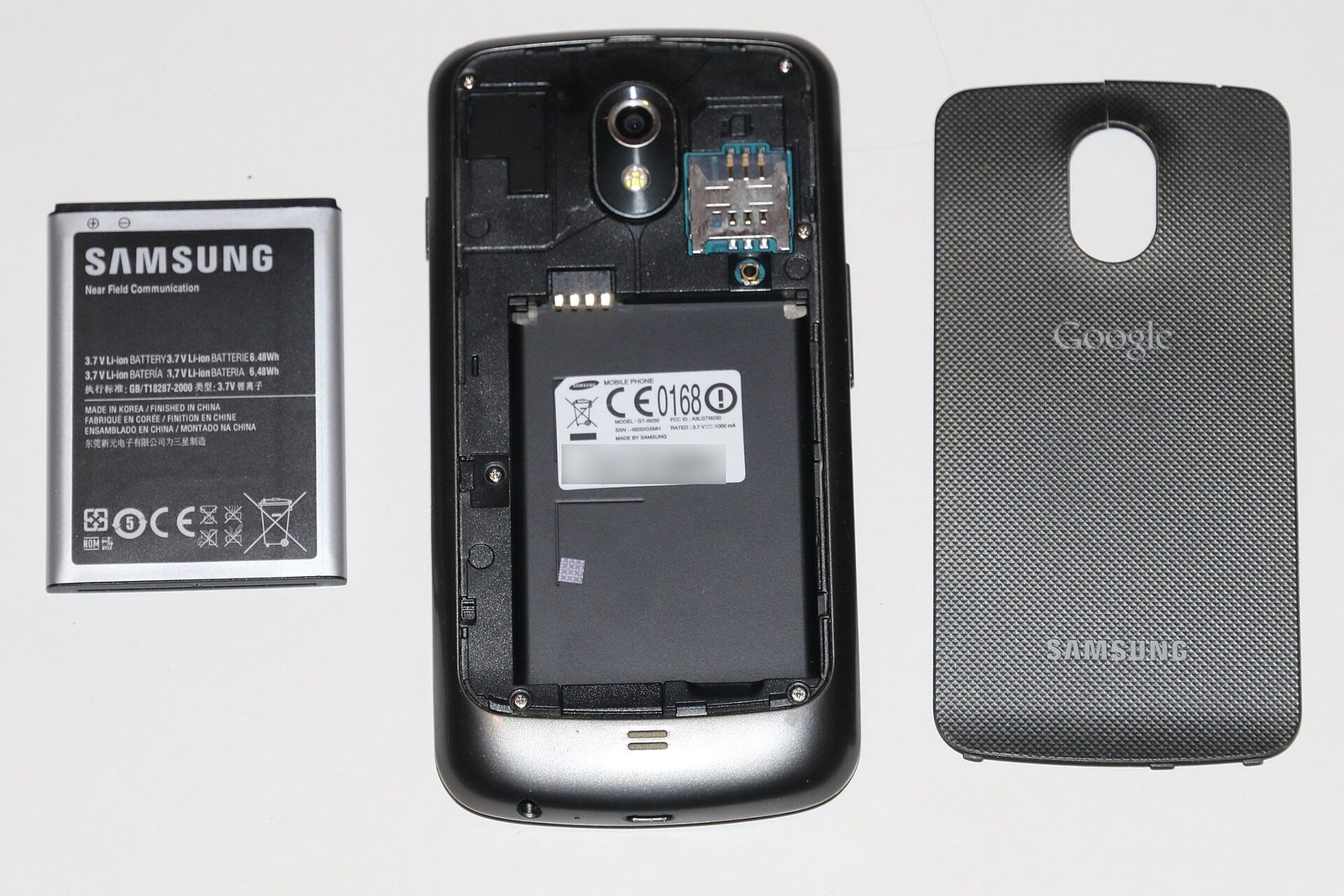
In a typical phone battery, one electrode is made of graphite and the other of a metal oxide containing lithium, with a liquid electrolyte between them. When you charge the phone, lithium ions move into the graphite. When you use it, they move back, and electrons flow through the phone’s circuits to power it.
Over time, side reactions build up a thin layer on the electrodes and lock away some of the lithium so it can no longer move back and forth. The electrodes themselves also wear slightly as they swell and shrink with each cycle. Less usable lithium means less capacity, and the battery’s internal resistance rises, which makes it harder to deliver bursts of power.
How charge cycles are counted
A cycle does not mean plugging in once. It means using the equivalent of 100 percent of the battery’s capacity, whether in one go or spread over several partial charges. Using half the battery on Monday and half on Tuesday adds up to one cycle. That is why topping up during the day is not, by itself, harmful.
What makes it age faster
- Heat. High temperatures speed up the unwanted reactions. Leaving a phone in a hot car or charging it under a pillow does more harm than most habits.
- Long periods at 100 percent. Sitting fully charged, especially when warm, adds stress.
- Deep discharges. Regularly running the battery completely flat is also hard on it.
Fast charging pushes more power into the battery, which generates more heat. Modern phones manage this by charging quickly when the battery is low and slowing down as it fills, but fast charging in a hot environment is still worth avoiding when you can.
Common misconceptions
- You do not need to drain the battery fully. The “memory effect”, where a battery seemed to forget capacity unless fully discharged, was a problem with older nickel-cadmium batteries, not lithium-ion.
- Charging overnight will not overcharge it. The phone’s charging system stops the charge when the battery is full. The concern is the time spent at 100 percent, which optimised charging settings are designed to reduce.
- Cold does not cause the same lasting damage as heat. A phone may lose charge quickly or shut down in freezing weather, but capacity usually returns once it warms up. Charging a very cold battery is best avoided, though.
- Closing all your apps does little for battery health. Modern operating systems manage background apps themselves.
Habits that help
- Keep the phone out of direct sun and hot cars.
- Turn on your phone’s battery protection or optimised charging setting, which delays charging past about 80 percent until you need it.
- Remove thick cases if the phone gets hot while charging.
- Use a reputable charger and cable.
If you are putting a phone away for several months, store it roughly half charged, switched off, somewhere cool. A battery stored completely flat for a long time may not recover.
Warning signs
A battery that swells, so that the screen or back starts to lift, should be treated seriously. Stop charging the phone, do not try to press it back into place or puncture it, and take it to a repair shop. Damaged lithium-ion batteries can overheat and catch fire.
When to replace it
Most phones show battery health in their settings. If capacity has dropped significantly, or the phone shuts down unexpectedly, a battery replacement is usually far cheaper than a new phone, and better for the environment.
Replacement has also become a policy issue. The European Union has adopted rules that, from 2027 and with some exceptions, are intended to make portable batteries in devices such as phones easier for users to remove and replace.
When a battery does reach the end of its life, do not put it in household rubbish. Many shops and local recycling centres accept old batteries, and the materials inside them can be recovered.
What is still uncertain
Researchers are working on new chemistries, including solid-state batteries that replace the liquid electrolyte, which could store more energy and age differently. It is not yet clear how soon they will appear in everyday phones at an affordable price, so for now the habits above remain the best way to make a battery last.
Test yourself
3 quick questions on what you just read. Your answers stay on your device.
Sources and further reading
We check our facts after publication too. If you spot an error, please tell us. Any correction will be noted here, as set out in our corrections policy.